
Digitizing paper payment slips
Since paper invoice and issuance and sending of payment slips are no longer necessary, this helps reduce costs related to paper, printing, and mailing, and contributes to streamlining billing operations.
Our Commitment
Reduce paper payment slips to just your smartphone
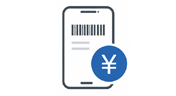
My Payment is a collection service where end users access a dedicated URL and present the barcode displayed on their smartphone at convenience stores or MMK-equipped stores to make payments. No prior user registration or downloading the dedicated app is required. Digitizing storage using paper invoice and payment slips can be used for billing utility charge, online shopping, and various service usage fees.
Since paper invoice and issuance and sending of payment slips are no longer necessary, this helps reduce costs related to paper, printing, and mailing, and contributes to streamlining billing operations.
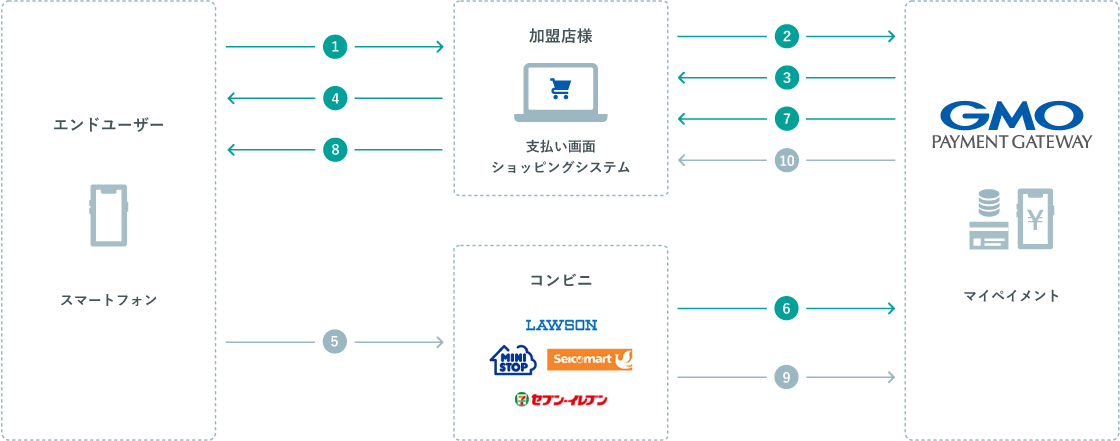
End users open a dedicated URL and present the displayed barcode at the store to payment. No prior user registration or downloading the dedicated app is required.
After payment at the store, payment results are usually notified, allowing merchants to check payment status. This helps streamline payment confirmation, clearance, and inquiry response.
* The timing of deposit result notifications depends on notifications from MyPayment to PG Multi-Payment Service and does not guarantee immediate notification.
In addition to major convenience stores nationwide, you can payment at MMK-equipped stores such as supermarkets and drugstores.
| Main payment Available Stores | Stores with 7-Eleven, Lawson, FamilyMart, Ministop, Seicomart, MMK |
|---|---|
| User Registration & Dedicated App | Not required |
| payment Amount | 1 yen~300,000 yen |
| Available Regions and Currencies | Japan / Japanese Yen |
| Connection method | OpenAPI Type, Link Type Plus |
| Payment deadline | Can be set up to 59 days after the current date |
No need to do so. End users open the dedicated URL sent to them and payment by presenting the barcode displayed on their smartphone at the store.
You can payment at major convenience stores nationwide, as well as at stores equipped with MMK such as supermarkets and drugstores. Please contact us for the latest available stores.
refund cannot be done through My Pay. If refund is needed after payment, merchants must refund directly to end users.
It may not be available depending on the product or service content of the member store.
* "My Payment" is a service provided by NTT Internet Corporation.
PG Multi-Payment Service can be used in as little as 2 weeks from the time of application.
Our sales representatives, who are familiar with a wide range of industries, will ask you about your current situation and issues and present the best plan, so please feel free to contact us using the inquiry form.
* The period of review and provision varies depending on the payment method.
Hearing from our representatives about your business and our PG Multi-Payment Service
We will explain and present you with the best payment plan and quotation for your company's requirements.
As soon as you agree to the contract conditions and the confirmation sheet at contract o'clock (described in the quotation), our representative will inform you of the application form.
Please agree to the terms and conditions and submit the necessary information.
In addition, we will inform you by e-mail of the WEB screen URL (information registration WEB) and login ID for entering your company information necessary for the examination procedure.
After accessing the URL, please enter the required items and respond until the registration is completed.
Based on the application form and the information provided, we will request merchant screening at each payment service provider.
The screening period varies depending on the service provider payment so please contact us for details.
After the review of the payment service provider is completed, we will perform the system settings and the final check of your site.
After the check is completed, we will send you the contents of the production environment settings by e-mail.
After testing on your production account, you can start using PG Multi-Payment Service.
* You can also use the test environment and download the specifications.
This is an environment in which tests are conducted in advance for the introduction of "PG Multi-Payment Service".
We provide specifications, manuals, and a set of management screens necessary for various payment processing (test operation).
If you have any questions or consultations about our services, please contact us.
Please feel free to contact us from the following.